
Kingston FURY BEAST
DDR5‑5600 / DDR5‑6000
High-end DDR5 RAM with On‑Die ECC, Intel XMP 3.0 & AMD EXPO — Ultimate gaming performance at the most reasonable price in the segment
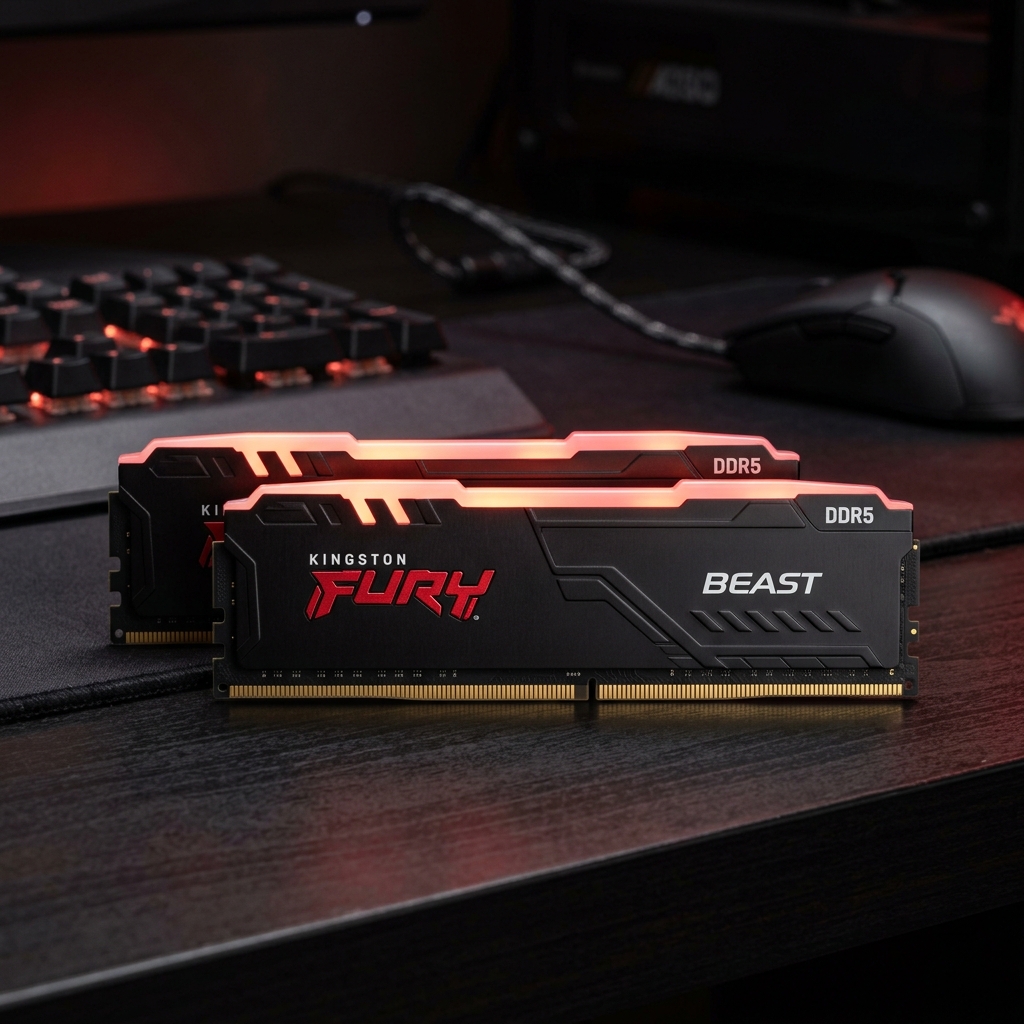
Why Choose Kingston FURY Beast DDR5?
6 reasons why this is the most popular DDR5 RAM in the mid-range price range
On‑Die ECC integrated
Automatically detects & corrects bit errors directly in the chip, minimizing system crashes and increasing stability when overclocking — a feature not available on DDR4.
Intel XMP 3.0 & AMD EXPO
Enable maximum speed with just 1 click in BIOS. Perfectly compatible with both Intel LGA1700/1851 and AMD AM5.
Low‑Profile heatsink
Solid aluminum conducts heat effectively. Low profile 100% compatible with large CPU coolers like Noctua NH‑D15, be quiet! Dark Rock Pro.
PMIC On‑Module
The Power Management IC is integrated directly into the RAM, providing precise, stable voltage to each memory chip — the foundation for safe overclocking.
Lifetime Warranty
Kingston offers Lifetime Warranty — a lifetime warranty. Invest once, use with peace of mind forever. Best in RAM industry.
Best Price Price Range
Compared to competitors in the same segment, Kingston FURY Beast DDR5 offers an outstanding performance/price ratio. DDR5 sweet spot in 2026.

Premium Design,
Lắp Đặt Đơn Giản
Kingston FURY Beast DDR5 uses a premium anodized aluminum heatsink with a delicate sandblast surface treatment. 34mm low profile ensures compatibility with all CPU coolers on the market.
- 10-layer PCB, extremely stable signal
- High-end Samsung / Hynix A-die memory chip
- There is an RGB version for a more beautiful setup
- Luxurious black & white

Overclocking Just One Step
Enable Intel XMP 3.0 (Intel) or AMD EXPO (AMD) in BIOS to unleash full performance. By default, DDR5 RAM runs at JEDEC 4800 MHz — turn on the profile and immediately have 5600 or 6000 MHz.
- Go to BIOS → find Memory/OC Profile section
- Choose XMP 3.0 (Intel) or EXPO (AMD)
- Save & reboot — done!
- No need for in-depth overclocking knowledge
Full Technical Specifications
Complete comparison of DDR5-5600 and DDR5-6000 to choose the right version
| Parameter | DDR5-5600 | DDR5-6000 ⭐ Recommended |
|---|---|---|
| Memory type | DDR5 SDRAM | DDR5 SDRAM |
| Form Factor | 288-pin UDIMM | 288-pin UDIMM |
| Speed (MT/s) | 5600 MT/s (PC5-44800) | 6000 MT/s (PC5-48000) |
| CAS Latency | CL36/CL40 | CL30/CL36/CL40 |
| Voltage | 1.25V – 1.35V | 1.35V |
| Kit capacity | 16GB/32GB/64GB | 16GB/32GB/64GB |
| Intel XMP 3.0 | ✅ Hỗ trợ | ✅ Hỗ trợ |
| AMD EXPO | ✅ Hỗ trợ | ✅ Hỗ trợ |
| On-Die ECC | ✅ Có | ✅ Có |
| Integrated PMIC | ✅ Có | ✅ Có |
| Heat sink | Aluminum Low‑Profile | Aluminum Low‑Profile |
| Compatible | Intel LGA1700/1851, AMD AM5 | Intel LGA1700/1851, AMD AM5 |
| Guarantee | Lifetime | Lifetime |
Realistic Gaming Performance
Benchmark with Intel Core i9-14900K + RTX 4080, 1080p Ultra resolution
* Cấu hình test: Intel Core i9-14900K | RTX 4080 16GB | Windows 11 23H2 | Nghiên cứu tổng hợp từ Tom's Hardware, Techradar, Club386
Review Overview
Strengths, weaknesses and detailed evaluation scores
✅ Advantages
- Gaming performance increases significantly compared to DDR4
- On‑Die ECC — extremely stable
- Supports both XMP 3.0 and AMD EXPO
- Low profile — compatible with all radiators
- Lifetime warranty — absolute peace of mind
- Best price/performance in price range
- Many options: capacity & speed
⚠️ Disadvantages
- Need DDR5 mainboard (cannot use with DDR4)
- The non‑RGB version does not have lights
- Need to update BIOS for stable 6000MHz
- DDR5 is still more expensive than DDR4 of the same capacity
Compare With Competitors
Kingston FURY Beast DDR5 vs other popular DDR5 RAMs
| Product | Speed | CAS Best | XMP/EXPO | Guarantee | Price 32GB (approx) |
|---|---|---|---|---|---|
| 🏆 Kingston FURY Beast DDR5-6000 | 6000 MT/s | CL30 | Both ✅ | Lifetime ♾️ | ~2,000,000 VND |
| G.Skill Trident Z5 DDR5-6000 | 6000 MT/s | CL30 | XMP only | Lifetime | ~2,800,000 VND |
| Corsair Vengeance DDR5-6000 | 6000 MT/s | CL36 | Both ✅ | Lifetime | ~2,400,000 VND |
| Crucial Pro DDR5-5600 | 5600 MT/s | CL46 | XMP only | Lifetime | ~1,600,000 VND |
| TeamGroup T-Force Vulcan DDR5 | 5600 MT/s | CL36 | Both ✅ | Lifetime | ~1,900,000 VND |
* Reference price March 2026, may change according to the market
Where to Buy? Best Price?
We have searched and compiled the most reliable purchasing sources
Buy on Shopee Vietnam
- Free shipping nationwide
- Flash sales weekly
- ShopeePay Refund
- Easy 7-day returns
- Many genuine shops
Buy on Amazon (International)
- 100% genuine product
- Prime delivery 2 days
- Return 30 days
- International warranty
- Price is stable, less volatile
📊 Refer to Price List (March 2026)
| Version | Capacity | Shopee VN price | Amazon Price |
|---|---|---|---|
| DDR5-5600 CL40 | 16GB (2×8GB) | ~800K – 1,000K | ~$40 |
| DDR5-5600 CL36 | 32GB (2×16GB) | ~1,400K – 1,700K | ~$60 |
| DDR5-6000 CL36 ⭐ | 32GB (2×16GB) | ~1,700K – 2,200K | ~$75 |
| DDR5-6000 CL30 | 32GB (2×16GB) | ~2,200K – 2,800K | ~$90 |
| DDR5-6000 CL36 | 64GB (2×32GB) | ~3,500K – 4,200K | ~$145 |
Frequently Asked Questions
Get all your questions answered before buying Kingston FURY Beast DDR5
Ready to Upgrade to DDR5?
Kingston FURY Beast DDR5-6000 32GB — The perfect sweet spot for 2026 PC gaming. Don't let your system be bottlenecked by RAM.
⚠️ Affiliate Disclosure: This page contains affiliate links to Shopee and Amazon. If you buy through these links, we may receive a small commission from the seller — which does not influence the price you pay. All reviews are objective and based on research and actual data. Product prices may change according to the market.